
Wireless network refresh: survey, design, deployment, validation
Wireless network refresh: survey, design, deployment, validation
Plan a WiFi refresh as a measured lifecycle: baseline the current WLAN, design around real requirements, deploy with change control, and validate the result after cutover.
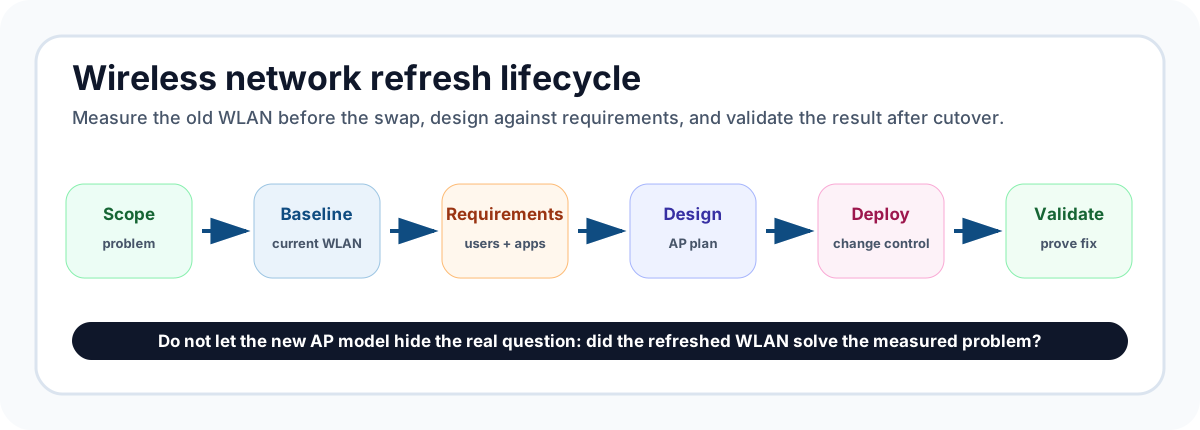
A wireless network refresh should not start with a shopping list of access points. The safer sequence is to understand what the current network is doing, decide what the refreshed WLAN must support, design the replacement around those requirements, deploy with a controlled cutover, and then validate that the new system actually fixed the problem.
PacketScout treats a refresh as a lifecycle, not a hardware swap. The access points matter, but the refresh succeeds or fails on the evidence gathered before and after the change: the floor plan, the current RF behavior, client symptoms, cabling and switch limits, AP mounting locations, roaming needs, channel plan, and the post-change validation survey.
Quick answer: the safe refresh sequence
For most business WiFi refresh projects, the clean sequence is:
- Scope the business problem. Identify the areas, applications, client devices, and symptoms that justify a refresh.
- Baseline the current wireless environment. Walk the site, collect RF measurements, mark problem zones, and compare coverage, SNR, noise, channel use, roaming behavior, and client reports against the floor plan.
- Check the wired and physical constraints. Confirm switch PoE budget, uplink capacity, cabling, AP mounting locations, ceiling height, attenuation, and whether proposed AP locations are practical.
- Design the refreshed network. Build the new AP layout and RF plan around actual requirements instead of simply replacing old APs one-for-one.
- Plan deployment and change control. Stage hardware, update configuration, schedule cutovers, preserve rollback options, and avoid changing every unknown at once.
- Validate after the change. Run a post-refresh survey, compare results to the baseline, tune where needed, and produce a report that shows what changed and what still needs attention.
That lifecycle keeps the refresh tied to measurable outcomes instead of assumptions.
When a wireless network refresh is really needed
A refresh is justified when the existing WLAN can no longer support the building, devices, or applications it is expected to carry. Common triggers include aging APs, new office layouts, warehouse racking changes, more dense client counts, new handheld scanners, voice or video complaints, failed coverage in renovated spaces, or a move to WiFi 6E or WiFi 7 clients.
The key is to separate three different situations:
| Situation | What it usually means | Best next step |
|---|---|---|
| Old APs but stable users | The hardware may be near end of support, but the RF design may still be acceptable | Plan a staged refresh and preserve the working design where the data supports it |
| Persistent coverage or roaming symptoms | The old design may not match the building, client mix, or channel plan | Start with a baseline survey and failure-mode review |
| New requirements or remodeled space | The old AP locations may no longer match the business need | Treat the refresh as a design project, not a like-for-like swap |
A like-for-like AP replacement can work in a simple building where the original design was good and the requirements have not changed. It becomes risky when the current AP layout was never measured, when floor plans changed, or when the pain point is roaming, co-channel interference, warehouse aisle coverage, conference rooms, or application reliability.
For a deeper survey-service discussion, PacketScout’s canonical service page is WiFi site survey services. This Field Note focuses on refresh sequencing.
Step 1: baseline the current network before changing hardware
The baseline survey is the evidence snapshot. It answers what the current WLAN is doing before the project team replaces equipment, moves APs, changes channels, or updates controller settings.
A useful baseline should capture:
- floor plan accuracy and scale;
- AP names, locations, mounting orientation, and visible obstructions;
- primary coverage and SNR in user areas;
- noise and interference patterns;
- channel reuse and co-channel pressure;
- roaming-sensitive zones such as hallways, nurse stations, classrooms, conference rooms, warehouse aisles, or loading docks;
- critical-client locations, not just general office space;
- user-reported problem areas and times of day;
- wired constraints such as PoE class, switch model, uplinks, and cabling path where available.
A baseline survey does not have to answer every design question by itself. Its job is to prevent guesswork. If the existing network is weak in a hallway because APs are mounted above hard ceilings, replacing those APs with newer models in the same wrong place may not solve the issue. If the symptom is video calls dropping during movement, stronger coverage in one room may not fix the roaming edge between rooms.
PacketScout’s WiFi site survey data collection guide covers how field data quality affects later decisions. If the refresh decision depends on the survey report, the data collection pass needs to be disciplined enough to support that decision.
Step 2: define the requirements the refreshed WLAN must meet
A refresh should translate business needs into technical targets before the design is drawn. Requirements do not need to be overcomplicated, but they should be explicit.
Useful requirements include:
| Requirement area | Refresh question to answer |
|---|---|
| Coverage | Which rooms, aisles, outdoor areas, or back-of-house spaces matter? |
| Capacity | Where do client counts spike, and which areas are no longer low-density? |
| Roaming | Do users move while on calls, carts, scanners, tablets, or mobile workstations? |
| Client mix | Are there 2.4 GHz-only devices, 5 GHz scanners, WiFi 6E clients, or legacy handhelds? |
| Applications | Which applications fail first: voice, video, inventory, point of sale, guest access, or general browsing? |
| Physical limits | Are existing cable drops, ceiling types, conduit, and switch closets usable? |
| Operations | Can the site tolerate downtime, or does it need phased cutover by zone? |
This step is where a refresh often becomes a design project. For the design-service intent, use PacketScout’s wireless network design services page as the canonical destination. This article keeps the design discussion tied to the refresh lifecycle.
Step 3: design against the building, not the old AP count
A common refresh mistake is to count old APs and buy the same number of new ones. That assumes the old placement was correct, the building has not changed, and the new radios should be used the same way. Those assumptions are often wrong.
A better design pass asks:
- Which old AP locations should be kept because the baseline proves they work?
- Which locations are poor because of attenuation, mounting, coverage holes, or roaming edges?
- Are there areas where fewer APs with better placement would outperform more APs in bad locations?
- Does the refresh introduce 6 GHz or new channel-width decisions that change the design?
- Are switch ports and PoE budgets ready for the proposed hardware?
- Are warehouse aisles, high ceilings, racking, metal shelving, or scanner paths being handled as their own RF environment?
Predictive design can help model candidate AP locations before cabling work begins, but it should not be treated as the final truth for complex sites. PacketScout’s predictive vs onsite WiFi survey article explains how those methods fit together.
The design output should be practical enough for implementation: AP locations, mounting notes, intended coverage zones, channel and power strategy, SSID/security assumptions, switch/PoE dependencies, and a list of items that must be verified after installation.
Step 4: plan deployment and change control
Deployment is where a technically sound design can still become disruptive. The goal is to make the change observable and reversible enough that issues can be isolated.
A refresh deployment plan should define:
- which area or floor changes first;
- what gets staged before field day;
- how old AP names, switch ports, controller groups, and cabling labels map to the new design;
- which settings are intentionally changed and which settings are preserved;
- who validates client access after each area is cut over;
- what rollback path exists if a critical area fails;
- how guest, production, scanner, voice, IoT, and admin networks are tested.
For smaller environments, this may be a short checklist. For larger sites, it should be a change window with owners and hold points. The point is not bureaucracy; it is avoiding a situation where AP hardware, switch power, controller settings, security policies, DHCP, DNS, and client drivers all change at once with no clean way to identify the cause of a new problem.
PacketScout’s consulting services path is useful when the refresh needs planning support, migration sequencing, or a second set of eyes before production cutover.
Step 5: validate after the refresh
A refresh is not complete when the last AP turns green in the dashboard. It is complete when the post-change evidence shows that the new WLAN meets the intended coverage, roaming, capacity, and application requirements.
Validation should include:
- a post-install survey over the same critical areas used in the baseline;
- spot checks in problem zones identified before the refresh;
- comparison of intended AP locations versus installed locations;
- verification of channel plan, transmit power, and band steering assumptions;
- client tests for the devices that matter most to the site;
- notes on remaining risks, not just a pass/fail heatmap.
The most useful output is a report that explains decisions. A heatmap alone shows measurements; a report turns those measurements into actions. PacketScout’s professional WiFi site survey report guide shows what a decision-ready deliverable should include.
What deliverables should come out of the process
A clean refresh should leave the organization with artifacts it can use later. At minimum, the project should produce:
| Deliverable | Why it matters |
|---|---|
| Baseline notes | Shows what problems existed before changes were made |
| Requirements summary | Prevents the refresh from drifting into vendor defaults |
| AP/location plan | Ties hardware placement to the building and client requirements |
| Deployment checklist | Gives the cutover team a controlled sequence |
| Validation survey/report | Confirms whether the refresh solved the right problem |
| Open-items list | Separates successful deployment from future tuning or cabling work |
These artifacts are also useful when the next upgrade cycle comes around. A building with a good baseline, accurate AP map, and validation report is much easier to improve than a building where the only record is a controller export and a memory of where users complained.
Common refresh mistakes to avoid
The same failure patterns show up repeatedly:
- replacing APs one-for-one without checking whether the old locations were good;
- skipping the baseline survey and losing the ability to prove improvement;
- assuming a controller health dashboard is the same as user experience;
- changing channel widths, power levels, SSIDs, authentication, and hardware at the same time;
- ignoring cabling, switch PoE, uplinks, or mounting limits until install day;
- designing for average users while the real pain is scanners, voice, or conference-room density;
- declaring success before the post-refresh validation pass is complete.
A refresh is the best time to correct old RF decisions. It is also the easiest time to repeat them if nobody measures first.
Where PacketScout fits
PacketScout can support different parts of the refresh depending on how much work the internal team wants to handle.
- If the team needs measurement and validation, start with WiFi site survey services.
- If the refresh depends on AP placement, cabling decisions, or WLAN architecture, use wireless network design services.
- If the team already has tooling and wants to collect data internally, survey equipment rental can support self-serve data collection, with PacketScout available to review results when interpretation matters.
- If the project is primarily planning, remediation, or change control, consulting support may be the better entry point.
The main point is to choose the service path based on the phase of the refresh, not to force every project into the same package.
FAQ
Can I refresh WiFi by replacing each old AP with a newer model?
Sometimes, but it is only safe when the old AP locations are known to be good and the building requirements have not changed. If the current network has coverage, roaming, scanner, voice, or capacity complaints, a one-for-one replacement can preserve the same design problems.
Should a wireless network refresh start with a survey or a design?
Start with enough survey and discovery work to understand the current environment. The design should then use that evidence, plus business requirements and wired constraints, to decide where the refreshed APs should go and what must be validated after installation.
What should be validated after new APs are installed?
Validate the critical areas from the baseline, the expected coverage and SNR, channel behavior, installed AP locations, roaming-sensitive paths, and the client devices that matter to the business. The validation report should identify both fixes and remaining risks.
Is predictive design enough for a refresh?
Predictive design is useful for planning AP locations and cable paths, especially before installation. It should be paired with onsite validation when the site has complex materials, high ceilings, roaming-sensitive clients, warehouse aisles, or a history of WiFi complaints.
When should I involve PacketScout?
Bring PacketScout in when the refresh needs a defensible baseline, AP design guidance, validation reporting, or help separating RF problems from cabling, switching, configuration, and client-device issues. The earlier the evidence is gathered, the less likely the project is to become guesswork.
Planning a WiFi refresh?
PacketScout can help baseline the current network, design the refreshed WLAN, or validate the result after installation.