
Coverage vs Capacity: Designing WiFi for Device Density
Why strong signal is not enough
A WiFi design can look healthy on a coverage map and still fail in daily use. The heatmap may be green, the access points may be visible everywhere, and a single test laptop may pass a quick speed check. Then the room fills with people, scanners start uploading, Teams calls begin, point-of-sale tablets reconnect, and the same network suddenly feels slow or unpredictable. That is the difference between coverage and capacity.
Coverage asks, “Can a client hear the network well enough in this area?” Capacity asks, “Can the network support the number of active clients, applications, and airtime demands in this area at the same time?” Those are related, but they are not the same design problem. A warehouse aisle with sparse handheld use may need reliable coverage over long paths and around racks. A conference room, classroom, clinic, or open office may need a smaller cell plan because many devices are competing for airtime in a compact area. In both cases, AP count is driven by more than square footage.
This Field Note explains how PacketScout separates coverage-first and capacity-first WiFi design decisions, why “users per AP” is an incomplete planning shortcut, and what inputs should drive a practical AP placement plan before cabling, mounting, or hardware purchases lock in the design.
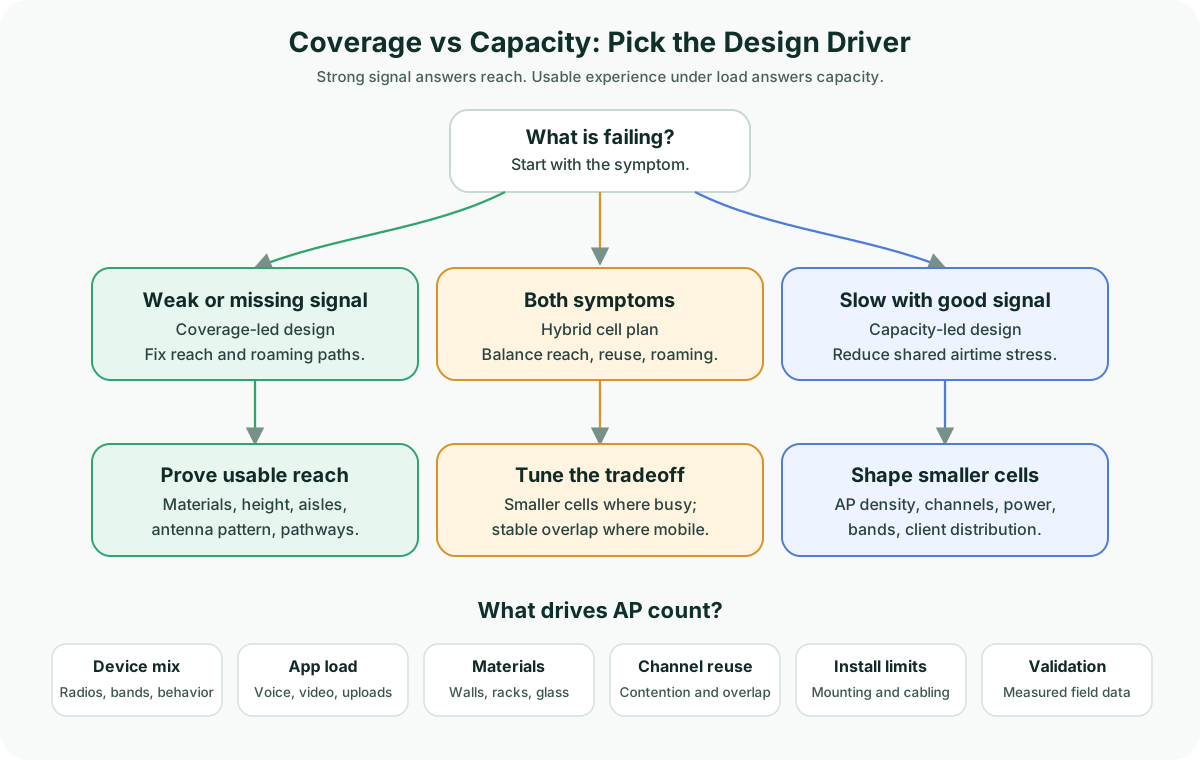
Coverage and capacity solve different failures
Coverage is the reach problem. It is about whether the wireless signal is usable in the places where devices must work. A coverage issue usually shows up as dead spots, marginal roaming paths, unreliable barcode scans at the far end of an aisle, weak signal behind dense construction, or devices dropping when someone moves from one area to another. Coverage design cares about floor plan shape, wall and rack attenuation, ceiling height, AP mounting location, antenna pattern, transmit power, and whether the intended signal can arrive where it is needed without creating avoidable interference elsewhere.
Capacity is the shared-medium problem. WiFi clients do not each get a private cable. They share airtime. A capacity issue can appear even when signal strength looks fine because too many clients, too much application traffic, too much management overhead, or too many competing cells are consuming the same RF resources. Capacity design cares about client count, device behavior, application mix, airtime efficiency, channel reuse, AP density, band steering, client capabilities, and whether cells are sized small enough to divide demand without causing excessive overlap.
The important point is that more signal is not always the fix. If a room is slow because one AP is serving too many active devices, raising power may increase the size of the problem. If the issue is hidden behind a block wall or storage rack, adding another AP without checking channel reuse may solve one spot and create another contention area. Good WiFi design starts by identifying which failure mode is dominant.
Why “users per AP” is only a starting question
It is natural to ask how many users an AP can support. The problem is that the number depends on what those users and devices are doing. Twenty mostly idle phones are not the same as twenty laptops in a video meeting. A handheld scanner sending small transactions behaves differently from a tablet uploading photos, a voice handset roaming during calls, or a classroom full of devices pulling content at the same time.
A better planning question is: what is the expected busy-hour airtime demand in each area, and how much of that demand can be supported by usable RF cells in that space? This keeps the design from relying on a generic AP specification or a square-footage rule. It also forces the right requirements to surface early:
- Which areas are business-critical, guest-only, or low priority?
- Which device types must work, and which ones have weak radios or limited band support?
- Which applications are sensitive to delay, roaming, upload performance, or retries?
- Where do people or mobile devices cluster during peak periods?
- Which walls, racks, glass, doors, machinery, or ceiling conditions change the RF model?
- Where can APs actually be mounted, powered, and cabled?
The answer to “how many users per AP?” should not be a single universal threshold. It should be an output of requirements, modeling, and validation. PacketScout’s WiFi survey planning tool can help scope AP count assumptions, but a final design still needs the context that a simple calculator cannot see: device mix, building materials, mounting constraints, application risk, and validation data.
What drives AP count in a capacity-aware design
AP count is often discussed as if it is just a coverage number. In a low-density space, that may be close enough for rough budgeting. In a busy business network, AP count is usually driven by several inputs at the same time.
Device density
The number of associated clients matters, but the number of active clients matters more. A design should separate laptops, phones, scanners, tablets, cameras, guests, and specialty devices.
Application behavior
Voice, video, payment workflows, inventory systems, uploads, and cloud applications create different risk profiles before cell size or validation tests are chosen.
Airtime efficiency
WiFi capacity is consumed by airtime, not just raw throughput. Older clients, low data rates, retries, and distant clients can consume more airtime than expected.
Channel reuse
Adding APs only helps if the design has a realistic reuse plan. For deeper RF theory, use the PacketScout guide to WiFi signal strength, SNR, noise, and channel overlap.
Materials and obstructions
Dense walls, glass, shelving, elevator cores, coolers, machinery, and rack contents can shrink or redirect a cell. See the PacketScout Field Note on building materials and RF attenuation.
Install reality and validation
Ceiling type, aesthetics, code constraints, lift access, cabling, and measured field data all affect the plan. A WiFi site survey can confirm where assumptions differ from the building.
Coverage-first, capacity-first, and hybrid cell plans
The right design stance depends on the dominant requirement. The table below is qualitative on purpose. It avoids pretending that one AP-to-user ratio applies to every building, device type, and application.
| Design situation | Dominant constraint | Cell-size tendency | Design response |
|---|---|---|---|
| Sparse warehouse paths, storage areas, back rooms, utility spaces | Reach and roaming continuity | Larger cells may be acceptable if airtime demand is low | Prove coverage around materials and racks; avoid unnecessary AP density |
| Conference rooms, classrooms, clinics, waiting rooms, busy retail areas | Shared airtime during peak use | Smaller, shaped cells are usually needed | Split demand across APs and channels; validate under realistic use |
| Open offices with collaboration tools | Mixed coverage and capacity | Moderate cells with careful overlap control | Balance roaming, channel reuse, and meeting-room peaks |
| Scanner or mobile workflow zones | Reliability during movement | Cells sized around paths and obstructions | Validate roaming paths, rack effects, and device behavior in the field |
| Guest-heavy spaces | High association count with unpredictable use | Smaller cells may be needed in gathering areas | Separate business-critical requirements from guest convenience |
| New builds before cabling | Design uncertainty | Model first, then refine | Use predictive design, collect requirements, and reserve flexibility for validation |
A practical decision flow
A useful coverage-versus-capacity design flow starts before the first AP location is chosen.
1. Define the work area and business priority. Not every square foot has the same requirement. Shipping, exam rooms, point-of-sale, conference rooms, and production areas may deserve more design attention than hallways or storage closets. Map the areas where WiFi failure has business impact.
2. Collect device and application requirements. Count device types, not just people. Separate laptops, phones, scanners, tablets, printers, cameras, guest devices, IoT devices, and voice handsets. Then classify the applications that matter: browsing, inventory, voice, video, cloud line-of-business apps, uploads, payments, or location-aware workflows.
3. Identify density zones. Mark where devices cluster during peak periods. A building average hides the real problem. Ten thousand square feet of mostly open space with one packed training room is not a uniform capacity design. The training room, huddle rooms, break areas, nurse stations, packing benches, or scanner staging areas may drive AP count more than the floor area does.
4. Decide whether the cell is coverage-led or capacity-led. If the issue is reach, the design may focus on placement, antenna choice, power, and material behavior. If the issue is airtime, the design may focus on smaller cells, channel reuse, band strategy, and client distribution. Many spaces need a hybrid answer: enough signal to roam, but not so much that every AP becomes part of one oversized contention domain.
5. Model AP placement against real constraints. Predictive design is strongest when it uses real floor plans, realistic wall assumptions, ceiling height, mounting constraints, and client requirements. If those inputs are uncertain, the model should be treated as a planning hypothesis. PacketScout’s wireless network design services focus on turning those assumptions into a practical AP placement plan that can be validated before installation decisions become expensive.
6. Validate with measured data. A design that matters to operations should be tested. Depending on the stage of the project, that may mean a predictive-versus-onsite decision, an AP-on-a-stick test, or a post-install validation survey. If you are choosing the right survey method, start with predictive vs onsite WiFi survey. If the work is already in the field, the WiFi site survey data collection guide explains why walking discipline and measurement quality affect the final answer.
Common mistakes that create capacity problems
The first mistake is designing only for the coverage heatmap. A green map is useful, but it does not prove that a high-density room has enough airtime for the applications that run there. Coverage is necessary. It is not sufficient.
The second mistake is adding APs without shrinking or shaping cells. Extra APs can improve capacity when channels, power, and placement are planned together. Extra APs can also create more contention if they are placed too close, powered too high, or forced into poor channel reuse.
The third mistake is using a single AP count rule across different spaces. A warehouse, office, clinic, classroom, retail floor, and outdoor yard do not have the same device behavior. Even within one building, the density plan may change from room to room.
The fourth mistake is validating with only one easy client. A test laptop near an AP may not reveal scanner roaming issues, guest-device congestion, upload-heavy workflows, or the behavior of older devices. Validation should reflect the critical clients and applications, not only the best-case client.
The fifth mistake is ignoring where the APs can actually go. A design that assumes perfect mounting locations may collapse during installation when beams, hard ceilings, aesthetic limits, lift access, or cabling constraints appear. Capacity planning should include installability early.
When a design needs a survey instead of a guess
If the project is a small, low-risk space, rough AP count planning may be enough to start a budget conversation. If the network supports business-critical operations, high client density, real time applications, scanners, medical devices, payment systems, or a building with uncertain materials, a design should not rely on square footage alone.
A predictive design can help answer where APs should go before cabling begins. An onsite survey can verify how the building actually behaves. A post-install validation can prove whether the installed network meets the intended coverage and capacity requirements. The right workflow depends on the risk, project stage, and quality of available floor plan and requirements data.
For office spaces, this is usually where conference rooms, huddle rooms, and open work areas need their own check. The office WiFi survey and design path focuses that work around video calls, dense client counts, roaming, and the rooms where poor WiFi turns into daily complaints.
PacketScout helps customers turn those questions into a practical design path: define requirements, model the likely AP plan, validate the assumptions that matter, and document what should change before the network becomes a daily support problem.
The takeaway
Coverage gets WiFi to the client. Capacity keeps the client experience usable when the space is busy. Good WLAN design does not choose one and ignore the other; it identifies which requirement is driving each area, then sizes cells, AP placement, channel reuse, and validation work around that reality.
If you are planning a refresh, build-out, warehouse upgrade, office move, or high-density area, start with the question behind the AP count: what must the wireless network support in each space, at peak use, with the actual devices that will be there? Once that is clear, the coverage and capacity design becomes a field-verifiable plan instead of a guess.